The browser is where the work happens, and where nobody is looking
Almost every application your staff touch now runs in a tab. Data leaves through the same tab, to places your network tooling cannot see, and most security programmes have no view of it at all.
Hilmand Khan21 November 20266 min read
Open a laptop at almost any organisation and look at what is actually running. A browser, with fifteen tabs, containing the customer system, the ticketing system, the code repository, the finance platform, mail and a document editor.
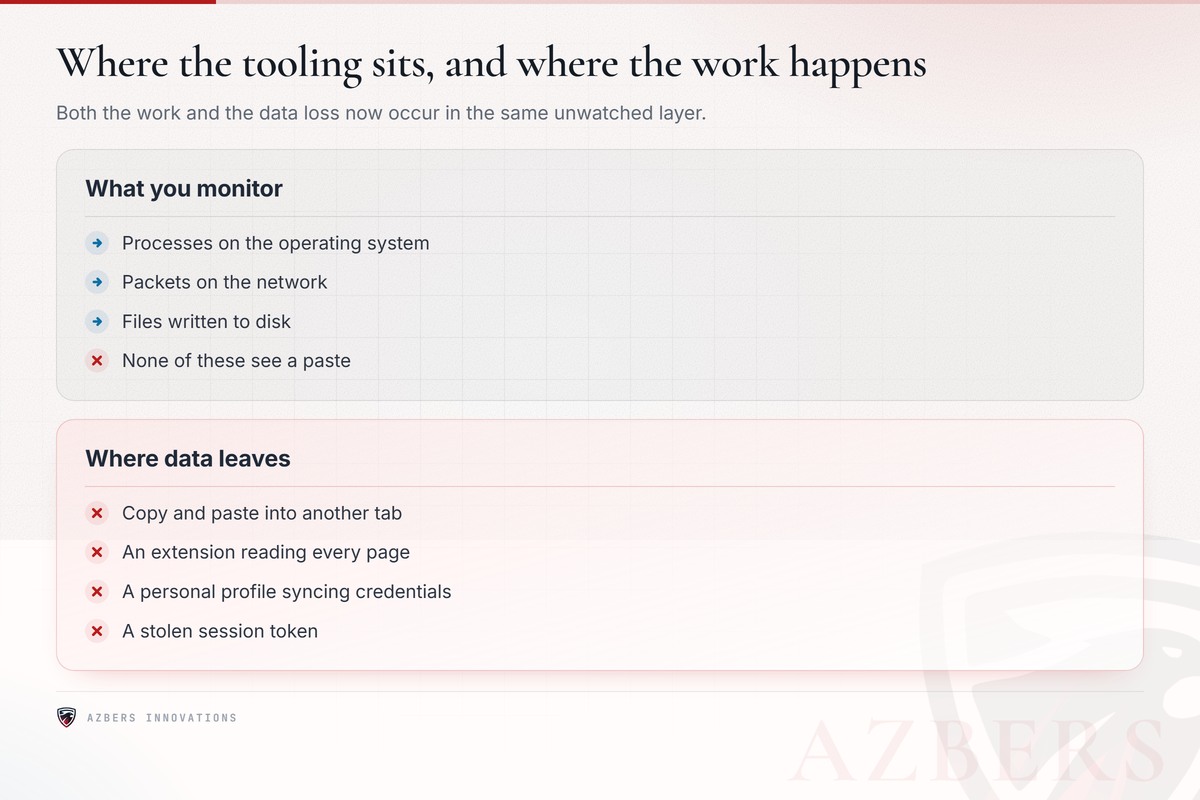
Then look at where the security tooling sits. Below the browser, watching processes on the operating system. Beside it, watching packets on the network. Nothing is looking at the layer where the work is actually happening.
That gap has become the most consequential blind spot in a lot of otherwise mature programmes, because both the work and the data loss now occur in the same place.
What the gap actually costs you
Security tooling watches processes and packets while data leaves as text in a tab.
Data leaves by copy and paste. A person copies from the customer system and pastes into a personal document, a messaging app or a public AI assistant. Nothing crossed the network in a form anything inspected, and no file was written for the endpoint agent to see. This is the shadow AI problem in its most common form, and blocking domains does not address it because the sanctioned and unsanctioned destinations are both ordinary websites.
Extensions hold more access than any application you review. An extension with permission to read and change data on all sites can read every page the user opens, including the customer system and the finance platform. Extensions update themselves, ownership changes hands quietly, and a popular utility can become something else after an acquisition. Most organisations have never enumerated what is installed across their fleet.
Personal and work profiles blur. Staff sign in to a personal profile for convenience, which syncs bookmarks, passwords and sometimes session data to a personal account. Corporate credentials leave through a feature, not an attack.
Session tokens matter more than passwords. An attacker with a valid session cookie never meets your authentication at all, which is one of the reasons multi factor authentication alone stopped being sufficient, as covered in MFA is not the finish line.
Unmanaged devices reach everything. A contractor on their own laptop signs in to your applications through a browser you have no control over.
Your data protection controls are watching files and packets. Your data leaves as text in a tab.
What actually helps
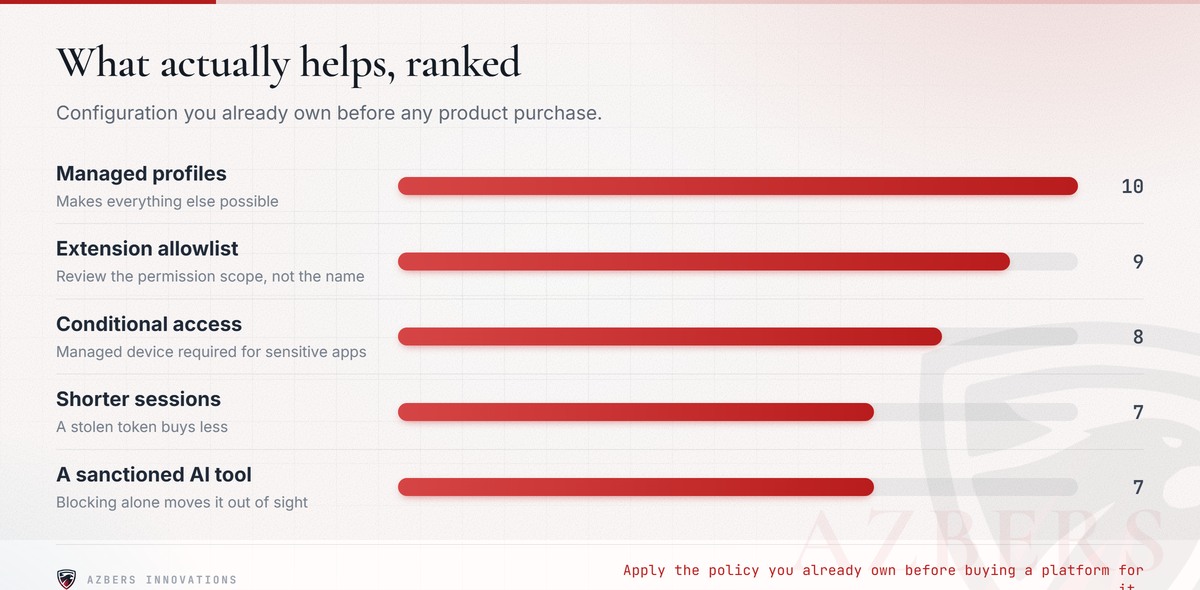
Managed profiles, an extension allowlist and conditional access before any product purchase.
Enforce managed profiles. Require work applications to be used in a managed browser profile tied to your identity provider, with policy applied. This single change makes everything else possible, because ungoverned browsers cannot be reasoned about.
Control extensions by allowlist. Not by blocklist, which is unwinnable. Decide what is permitted, allow those, and block the rest by default. Then review the permission scope of what you allowed, since the risk lives in scope rather than in identity.
Use conditional access properly. Managed device plus current posture plus known location for sensitive applications. This is the practical way to stop an unmanaged laptop reaching the finance platform, and it costs nothing beyond configuration in most identity platforms.
Shorten sessions where consequence is high. Long lived sessions are convenient and they are also what a stolen token buys. Administrators and finance should not have thirty day sessions.
Give people a sanctioned AI assistant. Blocking public assistants without providing an approved one moves the behaviour to personal phones where you have no visibility at all. This is the single most effective control available against the pasting problem, and it is a procurement decision rather than a security one.
Watch a few high consequence browser events. Bulk copy from a records system, mass download, a new extension with broad permissions appearing across many users. Low volume, high signal, and a manageable addition to the queue rather than a flood of the kind described in the alert queue nobody works.
A note on enterprise browsers
A category of enterprise browsers and secure browser extensions has grown up specifically to close this gap, offering control over copy, paste, download and screenshot inside work applications.
Some of it is genuinely useful, particularly for contractor and unmanaged device populations where you control nothing else. Two cautions before buying.
Much of what these products offer is already available through managed profile policy in the browsers you already deploy, and organisations routinely buy a platform to obtain configuration they had not yet applied. Apply the policy first, then see what gap remains.
And restrictive copy and paste controls have a predictable failure mode. If they make legitimate work materially harder, people move that work somewhere unmonitored, which is the outcome described in most insider risk is not malicious. Proportionality matters more here than in most controls.
Where we stand
We think most organisations should apply managed browser policy before buying anything, because the return on configuration they already own is higher than the return on a new product.
We also think the extension inventory is the most under appreciated quick win in this whole area. It costs an afternoon, it almost always finds something with permissions nobody would approve today, and the fix is a policy change rather than a project.
Our GRC practice brings browsers and extensions into asset and access review, which is where they belong and where they are almost never found. Our VAPT team tests session handling and token lifetime, which is the part of this that turns into an actual intrusion. Our security awareness work covers the paste problem by explaining the consequence rather than by issuing a prohibition, because prohibition without a sanctioned alternative reliably fails.
CyberNexus keeps the record of extension and application approvals with a named approver and a review date, since this is a control that decays every time somebody installs something.
Start here
Pull a list of browser extensions installed across your fleet, with their permission scopes.
Most organisations have never produced this list, and most find at least one extension with access to every page a user opens that nobody would approve today.
Common questions
Why is browser security a gap
Endpoint tooling watches processes and files, network tooling watches traffic. Work now happens inside a tab, where data moves by copy and paste to ordinary websites, so neither layer observes the action that matters.
Are browser extensions a security risk
They can be significant. An extension permitted to read and change data on all sites can read every page a user opens, including internal applications. Extensions update automatically and ownership can change without notice.
How do we stop staff pasting data into AI tools
Provide a sanctioned alternative first. Blocking public assistants without one moves the behaviour to personal devices where there is no visibility. Combine that with managed profiles and a small number of high consequence alerts.
Do we need an enterprise browser product
Not necessarily. Much of the capability is available through managed profile policy in browsers you already deploy. Apply that first, then assess the remaining gap, which is usually largest for unmanaged and contractor devices.
What browser controls have the highest return
Managed profiles tied to your identity provider, an extension allowlist with permission review, conditional access requiring a managed device for sensitive applications, and shorter session lifetimes for privileged roles.